
The Complete Guide to Copier Security

Modern copiers store data, connect to networks and process sensitive information, making security a critical part of protecting your business.

copier security-1Today's office copiers do far more than print documents.

Multifunction printers store data, connect to your network, send emails, access cloud platforms, manage user accounts and process sensitive information every day. In many businesses, they function much like any other network-connected computer.

That creates a challenge many organizations overlook.

While servers, laptops and mobile devices often receive significant attention from IT teams, copiers are frequently treated as office equipment rather than technology assets. As a result, important security settings may go unchecked, firmware updates may be missed and sensitive information may remain stored on devices long after it should have been removed.

Copier security isn't just an IT concern. It's a business risk, a compliance issue and an important part of protecting confidential information.

This guide explains how copier security works, the risks businesses face and the steps organizations can take to better protect their data.
Why Copier Security Matters

Many businesses are surprised to learn how much information passes through a copier.

A multifunction printer may process employee records, financial documents, legal contracts, medical information, customer records, tax forms and confidential business communications. Every time a user scans, copies, prints or emails a document, the device may temporarily or permanently store portions of that information.

At the same time, modern copiers are connected to corporate networks and cloud applications. They often have their own operating systems, web interfaces, user directories and administrative controls.

That means copier security isn't limited to protecting printed pages. It also involves securing stored data, network access, user authentication and device management.

For businesses with regulatory requirements, the stakes are even higher. Sensitive information stored on a copier can create compliance issues if devices aren't properly configured or retired.

How Copiers and Printers Store and Process Data

Most multifunction printers and copiers contain internal hard drives that help manage workflows and improve performance.

Depending on the device and configuration, a copier may store:

  • Printed documents
  • Scanned files
  • Fax images
  • Email attachments
  • Address books
  • User credentials
  • Workflow settings
  • Job histories
  • Network configuration information

Some information is stored temporarily while a job is being processed. Other data may remain on the device until it is overwritten, deleted or securely erased.

Many businesses assume documents disappear after printing. In reality, portions of that information may persist on the device long after the original task is complete.

This is one reason copier hard drive security has become such an important topic.

Related Reading: Copier Hard Drive Security: Does Your Copier Store Sensitive Data?

The Most Common Copier Security Risks

copier data securityNot every copier security issue results from a cyberattack.

In many cases, exposure occurs because basic safeguards were never implemented or because devices were overlooked during routine security reviews.

Stored Data Exposure

Many multifunction printers retain information on internal hard drives or solid-state storage devices.

If encryption, overwrite settings or data deletion procedures aren't properly configured, sensitive information may remain recoverable.

The risk often becomes apparent during lease returns, equipment upgrades, trade-ins or disposal.

Default Administrative Credentials

Manufacturers ship devices with default usernames and passwords to simplify installation.

If those credentials aren't changed after installation, unauthorized users may gain access to administrative controls, address books, network settings and stored information.

Strong password policies should apply to copiers just as they do to servers, workstations and computers.

Outdated Firmware

Copier firmware controls the device's operating functions and security features.

Like any software, firmware can contain vulnerabilities. Manufacturers regularly release updates that address security concerns and improve system performance.

Businesses that fail to apply updates may leave devices exposed to known risks.

Unsecured Network Access

Copiers communicate with servers, cloud services, email systems and user workstations.

Improper network configurations can create opportunities for unauthorized access, data interception or misuse of device services.

Network-connected copiers should be included in security reviews and vulnerability management programs.

Unclaimed Print Jobs

Printed documents left unattended on output trays remain one of the most common security concerns in office environments.

Confidential information can be viewed by unauthorized individuals simply because a document was printed and forgotten.

Secure print release technology helps reduce this risk by requiring user authentication before documents are released.

Improper Device Disposal

A copier that leaves your office without proper data deletion can create serious exposure.

Businesses often focus on securing computers and servers during retirement. Copiers deserve the same level of attention.

Copier Security Assessment

Security Features Every Business Should Enable

Today's copiers include a wide range of built-in security capabilities. Unforutnately, many organization only use a fraction of them.

Hard Drive Encryption

Encryption helps protect information stored on internal drives.

If a storage device is removed or compromised, encrypted data becomes significantly more difficult to access.

User Authentication

Authentication requires users to verify their identify before accessing device functions:

This may include:

  • PIN Codes
  • Usernames and passwords
  • Proximity cards
  • Single sign-on integrations

Authentication limits unauthorized access and creates accountability for device activity.

Secure Print Release

Secure print allows documents to remain in a protected queue until the user authenticates at the device.

This helps prevent sensitive information from sitting unattended in output trays.

Role-Based Access Controls

Not every employee requires access to every feature.

Role-based permissions allow administrators to control who can print, scan, fax, access address books or modify settings.

Audit Logs

Most enterprise devices maintain activity logs.

These records help administrators monitor usage, investigate incidents and support compliance requirements.

Automatic Data Overwrite

Many devices an automatically overwrite stored information after jobs are completed. This reduces the likelihood that deleted data can be recovered later.

Encrypted Data Transmission

Information moving between users, servers and devices should be encrypted while in transit.

This helps protect sensitive information from interception.

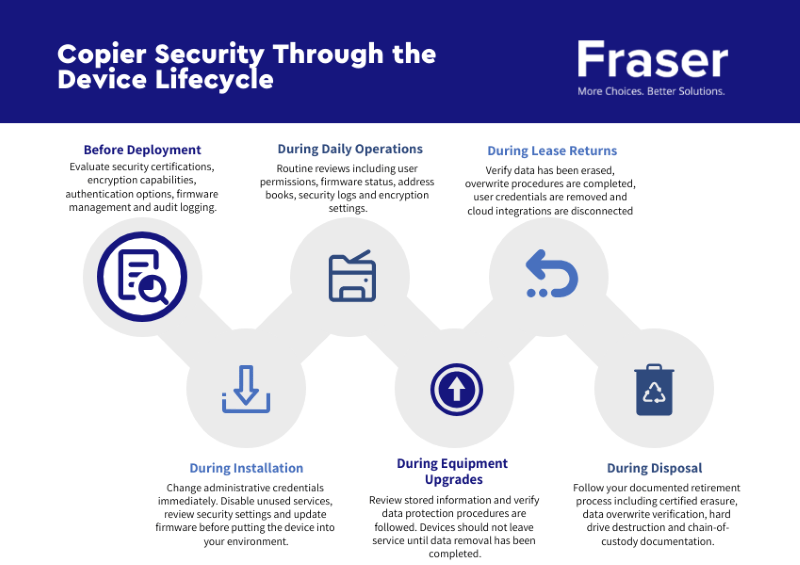
Copier Security Throughout the Device Lifecycle

copier security through device lifecycle v1One of the most overlooked aspects of copier security is the device lifecycle itself.

Security should begin before deployment and continue through retirement.

Before Deployment

Organizations should evaluate:

  • Security certifications
  • Encryption capabilities
  • Authentication options
  • Firmware management
  • Audit logging capabilities

Security should be part of the purchasing decision, not an afterthought.

During Installation

Administrative credentials should be changed immediately.

Unused services should be disabled, security settings should be reviewed and firmware should be updated before the device enters production.

Discuss with your provider what steps they are taking prior to installation to make your device more secure. Some providers offer hardening services as part of their installation.

During Daily Operations

Routine reviews help ensure devices remain secure.

This includes:

  • Reviewing user permissions
  • Monitoring firmware status
  • Evaluating address books
  • Reviewing security logs
  • Confirming encryption settings

During Equipment Upgrades

Replacing equipment creates an opportunity to review stored information and verify that data protection procedures are followed.

Old devices should not leave service until data removal requirements have been completed.

During Lease Returns

Lease returns are one of the most common sources of copier security concerns.

Businesses often assume data removal is handled automatically. That assumption can create risk.

Before returning a leased copier, organizations should verify

  • Data has been erased
  • Overwrite procedures have been completed
  • User credentials have been removed
  • Cloud integrations have been disconnected
  • Documentation is available if required

During Disposal

Retired copiers should follow a documented retirement process.

Depending on organizational requirements, this may include:

  • Certified hard drive erasure
  • Data overwrite verification
  • Hard drive destruction
  • Chain-of-custody documentation

Get My Free Tech Assessment Today! ($995 value)

How Managed Print Services Improve Copier Security

Many organizations struggle to maintain consistent security standards across an entire fleet of devices.

Managed Print Services can help by creating centralized oversight and ongoing management.

A properly designed managed print program may include:

  • Security policy enforcement
  • Firmware management
  • Device monitoring
  • User authentication controls
  • Usage reporting
  • Secure print workflows
  • Automated supply management

Beyond improving efficiency, managed print services can help reduce security gaps that occur when devices are managed inconsistently across locations.

Related Reading: Managed Print 101 Guide: The Key to Smarter, Safer, and More Efficient Printing

When Copier Security Becomes a Cybersecurity Issue

Copiers are no longer isolated office equipment.

They are network-connected endpoints that interact with users, servers, cloud platforms and business applications.

As a result, copier security increasingly overlaps with broader cybersecurity programs.

Organizations should consider how multifunction printers fit within their managed IT services, including:

  • Asset inventories
  • Endpoint management
  • Vulnerability assessments
  • Network segmentation
  • Security monitoring
  • Incident response planning

A copier that is excluded from cybersecurity planning can create visibility gaps that make risk management more difficult.

Businesses that take a comprehensive approach to cybersecurity should include multifunction printers alongside other network-connected assets.

Copier Security and Compliance Requirements

Many industries have specific obligations related to data privacy and information protection.

Because copiers often process sensitive information, they can play a role in compliance efforts.

Healthcare

Healthcare organizations routinely process patient information, insurance documentation and medical records.

Security controls help support privacy requirements and reduce exposure risks.

Financial Services

Banks, accounting firms and financial institutions handle highly sensitive financial information.

Secure printing, encryption and access controls are important considerations.

Legal Organizations

Law firms process confidential client information, contracts and litigation documents. Protecting document workflows is critical

Education

Educational institutions often manage student records, financial aid information and personnel files.

Copier security helps support broader data protection efforts.

Government Agencies

Government organizations frequently handle regulated and confidential information.

Security settings, auditing capabilities and retirement procedures become especially important.

Copier Security Checklist

checklist graphic email 1Use this checklist to evaluate your current print environment.

  • Change default administrator passwords
  • Enable hard drive encryption
  • Configure secure print release
  • Require user authentication
  • Review user permissions
  • Enable automatic overwrite functions
  • Apply firmware updates
  • Encrypt data transmissions
  • Review stored workflows and address books
  • Audit device activity regularly
  • Include copiers in cybersecurity planning
  • Establish retirement procedures
  • Verify data removal before disposal

Even small improvements can help reduce risk and improve visibility.

Related resource: Download our Free Copier Security FAQ

Frequently Asked Questions About Copier Security

Q: Are copiers considered cybersecurity risks?
A: Yes. Modern multifunction printers and copiers store information, connect to networks and process sensitive data. They should be included in broader cybersecurity programs.

Q: Do all copiers and printers store documents?
A: Most multifunction printers store at least some information during normal operations. The amount of retained data varies by model and configuration.

Q: Can deleted files be recovered from a copier?
A: In some situations, yes. Data that has not been securely overwritten or destroyed may remain recoverable.

Q: What is copier hard drive encryption?
A: Encryption protects information stored on internal drives by making it unreadable without proper authorization.

Q: What happens to copier data when a lease ends?
A: Unless a data deletion process is completed, information may remain on the device after it is returned.

Q: How often should copier security settings be reviewed?
A: Security settings should be reviewed regularly and whenever significant changes occur within the organization.

Q: Is secure printing worth enabling?
A: Yes. Secure print release helps prevent confidential documents from being viewed by unauthorized individuals.

Q: Should copiers be included in cybersecurity audits?
A: Absolutely. They are network-connected devices that process sensitive information and should be evaluated alongside other technology assets.

Protecting Data Beyond the Device

Copier security is no longer limited to passwords and firmware updates.

Organizations need a process that addresses how devices are deployed, managed, monitored, upgraded and retired. Security controls are important, but so is having a plan for the entire lifecycle of the device.

Businesses that treat multifunction printers and copiers as part of their broader technology and cybersecurity strategy are generally better positioned to protect sensitive information and reduce avoidable risk.

If you're unsure whether your current devices meet today's security standards, a print security assessment can help identify gaps and prioritize improvements.
copier security review

trophy icon

Award-Winning Service

Our Sharp and Canon factory-certified technicians are here for all of your service needs.

thumb icon

NPS Score of 94.5

95 out of 100 customers would recommend Fraser to a friend or colleague.

tool icon

Maximum Uptime

With a 93.1% First Call Fix Rate, we provide proactive service that keeps your print fleet running.

shield icon

Advanced Security

With the most advanced security features, we work to keep your data safe and protected.

Fraser's Learning Zone

Explore resources that help you understand how copiers and printers can help your business grow!
5 min read
Cloud Backup for Business: Benefits, Risks and Best Practices
Most businesses depend on data to keep daily operations moving. Customer records, financial information, email,...
8 min read
VoIP vs. Traditional Phone Systems for Business: What to Know Before Upgrading
Business communication has changed quickly over the last decade. Many companies still rely on legacy phone...
6 min read
Managed IT vs. Break/Fix: Which Supports Your Business Best?
Most businesses don't compare IT support models until something starts slipping. Systems slow down. Issues take longer...

Got Questions? We Can Help!

Our friendly tech experts are here to help you find ways to boost your business efficiency, tighten security and save you money!